InSUREance Developer Guide
Acknowledgements
ChatGPT was heavily used to help create test case templates, although the ideas behind the test cases were mostly thought by the developers.
We would also like to acknowledge group CS2103T-W14-1 as we followed a similar format for the command explanations in the user guide based on their user guide,
and group CS2103-F10-2 as we followed their test cases for saving data based on their developer guide.
Setting up, getting started
Refer to the guide Setting up and getting started.
Design
Architecture
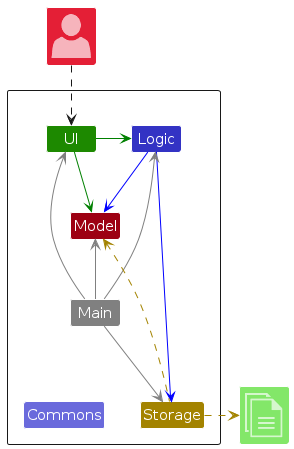
The Architecture Diagram given above explains the high-level design of the App.
Given below is a quick overview of main components and how they interact with each other.
Main components of the architecture
Main (consisting of classes Main and MainApp) is in charge of the app launch and shut down.
- At app launch, it initializes the other components in the correct sequence, and connects them up with each other.
- At shut down, it shuts down the other components and invokes cleanup methods where necessary.
The bulk of the app's work is done by the following four components:
UI: The UI of the App.Logic: The command executor.Model: Holds the data of the App in memory.Storage: Reads data from, and writes data to, the hard disk.
Commons represents a collection of classes used by multiple other components.
How the architecture components interact with each other
The Sequence Diagram below shows how the components interact with each other for the scenario where the user issues the command delete 1.
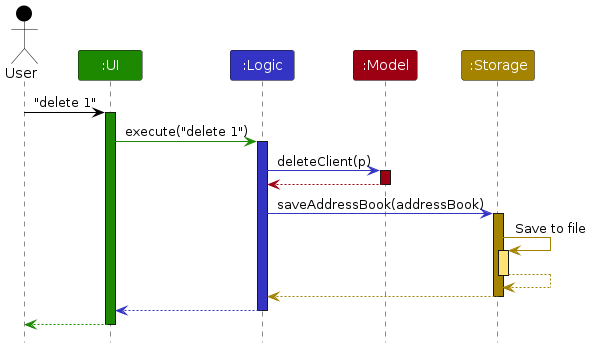
Each of the four main components (also shown in the diagram above),
- defines its API in an
interfacewith the same name as the Component. - implements its functionality using a concrete
{Component Name}Managerclass (which follows the corresponding APIinterfacementioned in the previous point.
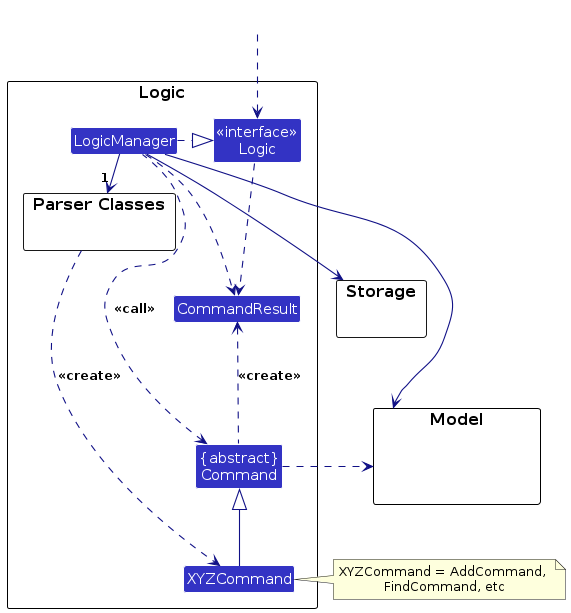
For example, the Logic component defines its API in the Logic.java interface and implements its functionality using the LogicManager.java class which follows the Logic interface. Other components interact with a given component through its interface rather than the concrete class (reason: to prevent outside component's being coupled to the implementation of a component), as illustrated in the (partial) class diagram below.
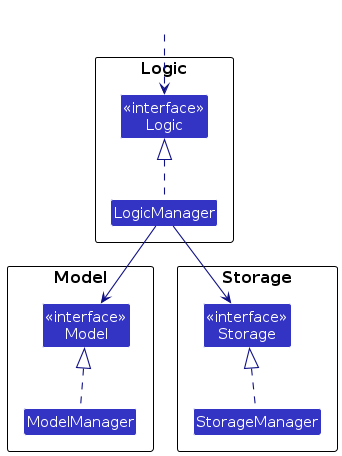
The sections below give more details of each component.
UI component
The API of this component is specified in Ui.java
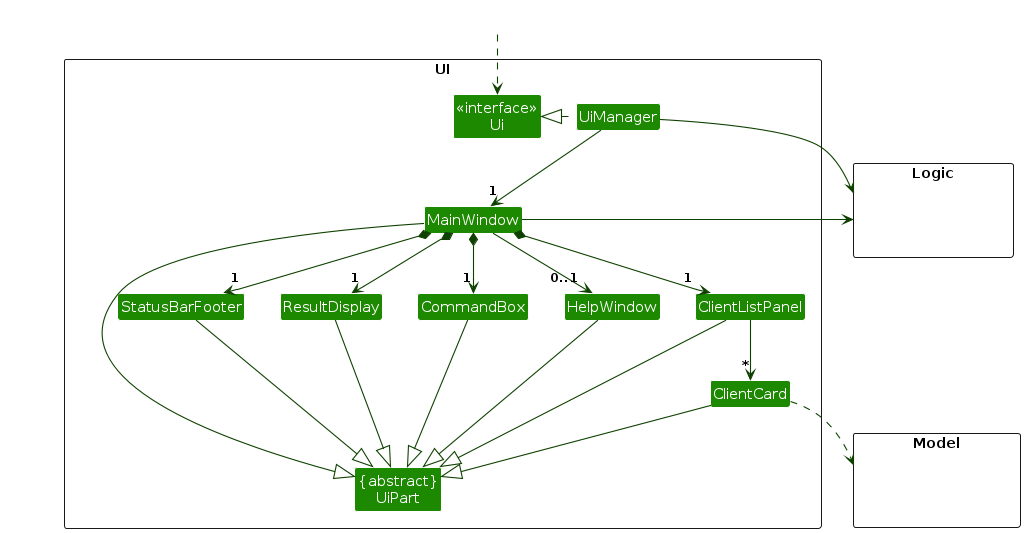
The UI consists of a MainWindow that is made up of parts e.g.CommandBox, ResultDisplay, ClientListPanel, StatusBarFooter etc. All these, including the MainWindow, inherit from the abstract UiPart class which captures the commonalities between classes that represent parts of the visible GUI.
The UI component uses the JavaFx UI framework. The layout of these UI parts are defined in matching .fxml files that are in the src/main/resources/view folder. For example, the layout of the MainWindow is specified in MainWindow.fxml
The UI component,
- executes user commands using the
Logiccomponent. - listens for changes to
Modeldata so that the UI can be updated with the modified data. - keeps a reference to the
Logiccomponent, because theUIrelies on theLogicto execute commands. - depends on some classes in the
Modelcomponent, as it displaysClientobject residing in theModel.
Logic component
API : Logic.java
Here's a (partial) class diagram of the Logic component:
The sequence diagram below illustrates the interactions within the Logic component, taking execute("inputString") API call as an example.
inputString refers to any valid addClaimCommandInput that can be passed in.
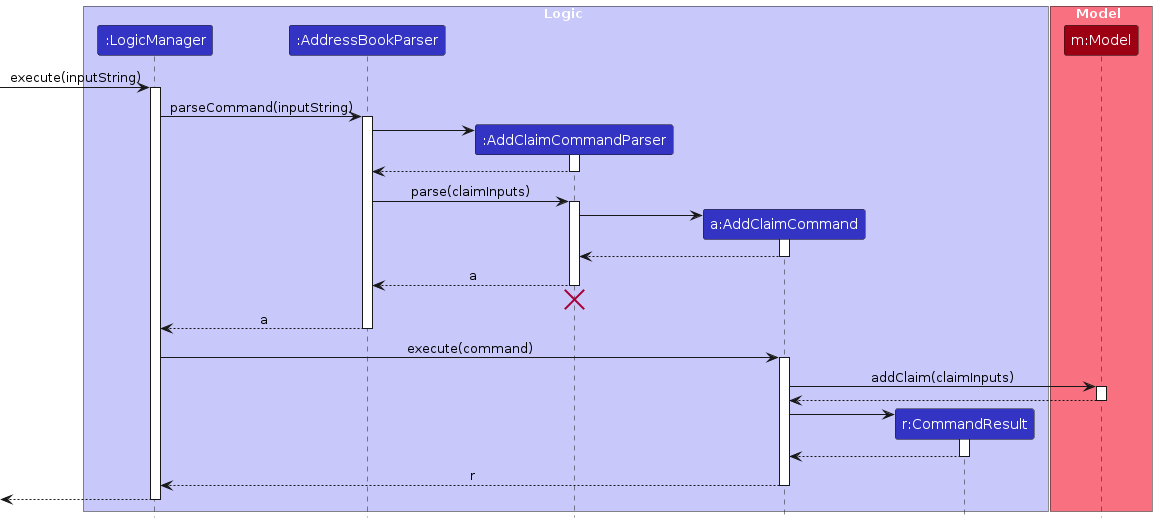
Note: The lifeline for AddClaimCommandParser should end at the destroy marker (X) but due to a limitation of PlantUML, the lifeline continues till the end of diagram.
How the Logic component works:
- When
Logicis called upon to execute a command, it is passed to anAddressBookParserobject which in turn creates a parser that matches the command (e.g.,AddClaimCommandParser) and uses it to parse the command. - This results in a
Commandobject (more precisely, an object of one of its subclasses e.g.,AddClaimCommand) which is executed by theLogicManager. - The command can communicate with the
Modelwhen it is executed (e.g. to add a claim to a client).
Note that although this is shown as a single step in the diagram above (for simplicity), in the code it can take several interactions (between the command object and theModel) to achieve. - The result of the command execution is encapsulated as a
CommandResultobject which is returned back fromLogic.
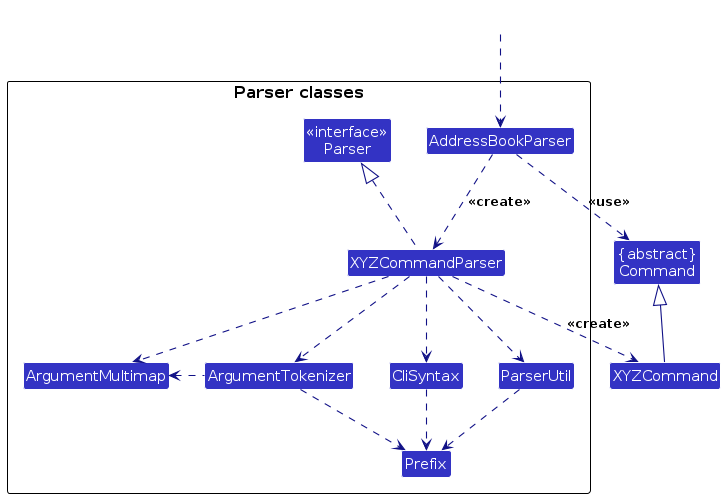
Here are the other classes in Logic (omitted from the class diagram above) that are used for parsing a user command:
How the parsing works:
- When called upon to parse a user command, the
AddressBookParserclass creates anXYZCommandParser(XYZis a placeholder for the specific command name e.g.,AddCommandParser) which uses the other classes shown above to parse the user command and create aXYZCommandobject (e.g.,AddCommand) which theAddressBookParserreturns back as aCommandobject. - All
XYZCommandParserclasses (e.g.,AddCommandParser,DeleteCommandParser, ...) inherit from theParserinterface so that they can be treated similarly where possible e.g, during testing.
Model component
API : Model.java
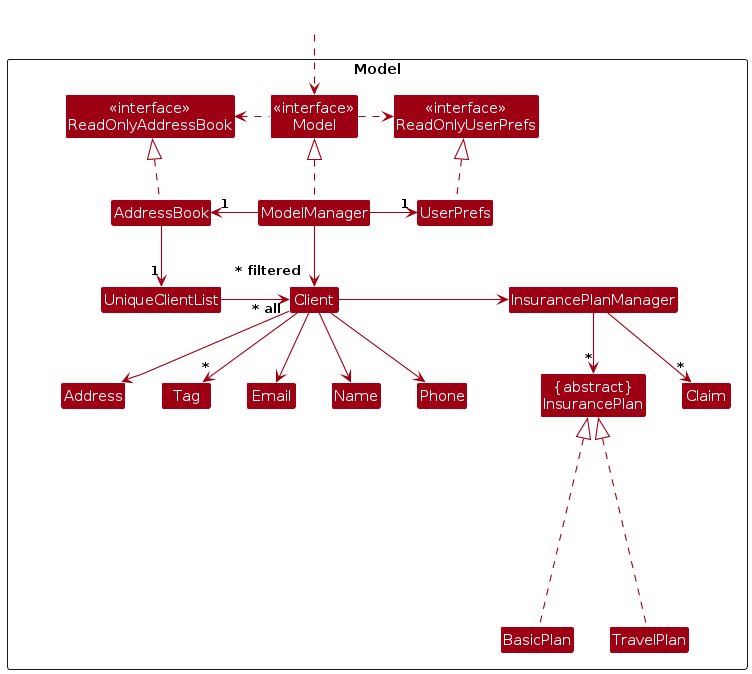
The Model component,
- stores the address book data i.e., all
Clientobjects (which are contained in aUniqueClientListobject). - stores the currently 'selected'
Clientobjects (e.g., results of a search query) as a separate filtered list which is exposed to outsiders as an unmodifiableObservableList<Client>that can be 'observed' e.g. the UI can be bound to this list so that the UI automatically updates when the data in the list change. - stores a
UserPrefobject that represents the user’s preferences. This is exposed to the outside as aReadOnlyUserPrefobjects. - does not depend on any of the other three components (as the
Modelrepresents data entities of the domain, they should make sense on their own without depending on other components)
Storage component
API : Storage.java
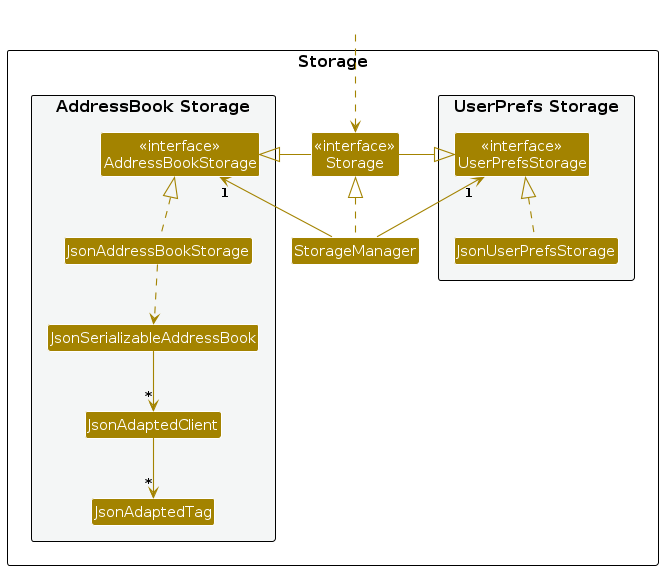
The Storage component,
- can save both address book data and user preference data in JSON format, and read them back into corresponding objects.
- inherits from both
AddressBookStorageandUserPrefStorage, which means it can be treated as either one (if only the functionality of only one is needed). - depends on some classes in the
Modelcomponent (because theStoragecomponent's job is to save/retrieve objects that belong to theModel)
Common classes
Classes used by multiple components are in the seedu.address.commons package.
Documentation, logging, testing, configuration, dev-ops
Appendix: Requirements
Product scope
Target user profile: Insurance Agents
- is based in Singapore
- has a need to manage a significant number of insurance clients
- prefer desktop apps over other types
- can type fast
- prefers typing to mouse interactions
- is reasonably comfortable using CLI apps
Value proposition: Our app helps insurance agents effortlessly manage new and existing clients, offering features for tracking insurance plans and claims, all while staying organised and efficient."
User stories
Priorities: High (must have) - * * *, Medium (nice to have) - * *, Low (unlikely to have) - *
| Priority | As a … | I want to … | So that I can… |
|---|---|---|---|
* * * | new user | view the help page | refer to instructions when I forget how to use the app |
* * * | basic user | add a client | keep track of client's contact details |
* * * | basic user | delete a client | remove client's contact details that I no longer need |
* * | intermediate user | edit a client | update client's contact when necessary |
* * * | basic user | list all clients | view all clients in the app |
* * * | efficient user | find a client by name | quickly retrieve client's contact without looking through all my contacts |
* * * | basic user | add an insurance plan to a client | keep track of the insurance plan the client has purchased |
* * * | basic user | delete an insurance plan from a client | remove an insurance plan that was previously purchased by the client |
* * | intermediate user | add a claim to an insurance plan purchased by a client | keep track of a claim filed against an insurance plan |
* * | intermediate user | delete a claim from an insurance plan purchased by a client | remove a wrongly-added claim from an insurance plan |
* * | intermediate user | close a claim filed against an insurance plan purchased by a client | mark the claim as closed |
* * | intermediate user | list all claims of a client | view all claims filed for the various insurance plans purchased by the client |
* | frequent user | customise the theme of the app | change the theme according to my mood and liking |
* * | basic user | clear all contacts from the app | quickly reset my app to an empty state |
* * * | basic user | exit the app | close the app when I am done using it |
Use cases
(For all use cases below, the System is the InSUREance and the Actor is the user, unless specified otherwise)
Use case 01: Add a client
MSS
- User requests to add a new client.
- System shows successfully added a new client message.
Use case ends.
Extensions
1a. Client details are invalid.
- 1a1. System shows invalid client details error message.
- 1a2. User enters new client details.
Steps 1a1-1a2 are repeated until the data entered is correct
Use case resumes from step 3.
1b. Client name is identical to another client that already exists inside the system.
- 1b1. System sends a warning about identical client to user.
Use case resumes from step 2.
MSS
- User requests to select a client.
- System selects the client.
Use case ends.
Extensions
1a. Client index is invalid.
- 1a1. System shows invalid index error message.
- 1a2. User enters new index.
Steps 1a1-1a2 are repeated until the index is valid.
Use case resumes from step 2.
Use case 03: Delete a client
MSS
- User requests to list clients.
- System shows a list of clients.
- User select a client to delete.
- System deletes the client.
Use case ends.
Extensions
- 2a. The list is empty.
Use case ends.
Use case 04: Select an insurance plan
MSS
- User selects an insurance plan ID.
- System has selected the insurance plan ID.
Use case ends.
Extensions
1a. The insurance plan id is invalid.
- 1a1. System shows an error message to user.
Use case ends.
1b. The client does not support the specified insurance plan.
- 1b1. System shows an error message to user.
Use case ends.
Use case 05: Add an insurance plan to a client
MSS
- User requests to list clients.
- System shows a list of clients.
- User select a client and select an insurance plan to be added to the specified client.
- System adds the insurance plan to the client.
Use case ends.
Extensions
3a. The client already has the given insurance plan.
- 3a1. System shows an error message.
Use case ends.
Use case 06: Remove an insurance plan from a client
MSS
- User requests to list clients.
- System shows a list of clients.
- User select a client, select an insurance plan of that client and requests it to be deleted.
- System removes the insurance plan from the client.
Use case ends.
Use case 07: View all claims of a client
MSS
- User select a client and requests to view all claims of that client.
- System shows all claims for the client.
Use case ends.
Extensions
2a. There are no claims for the client.
- 2a1. An appropriate message about the client having no claims will be shown.
Use case ends.
Use case 08: Select a claim of a client
MSS
- User select a client, select an insurance plan of the client and requests to select a claim of that specific insurance plan.
- System selects the claim specified by the user.
Use case ends.
Extensions
1a. Claim ID is invalid.
- 1a1. An appropriate error message will be shown.
Use case ends.
Use case 09: Add a claim to a client
MSS
- User select a client and select an insurance plan of that client and requests to add a claim to selected insurance plan.
- System adds the claim to the insurance plan.
Use case ends.
Extensions
1a. The claim already exists for the client.
- 1a1. System shows an error message.
Use case ends.
Use case 09: Close a claim for a client
MSS
- User select a client, select a claim and requests to close that claim for the specified client.
- System closes the claim for the client.
Use case ends.
Extensions
1a. The claim has already been closed for the client.
- 1a1. System shows that claim is closed with no error.
Use case ends.
Non-Functional Requirements
- Should work on any mainstream OS as long as it has Java
17or above installed. - The data should be stored locally in a JSON file.
- The data should be stored in a way that complies with the Personal Data Protection Act, Singapore [PDPA].
- Should be able to hold up to 1000 clients without a noticeable sluggishness in performance for typical usage.
- A user with above average typing speed for regular English text (i.e. not code, not system admin commands) should be able to accomplish most of the tasks faster using commands than using the mouse.
- The app should display results within 2 seconds when searching for a client.
- The app should save the data entered even if it exits unexpectedly while running.
- The app should have a log of user actions for debugging purposes.
- The app should help users validate their inputs for their client's claim information as they are adding or deleting the inputs based on known market standards.
Glossary
- Mainstream OS: Windows, Linux, Unix, MacOS
- Insurance Agent: The user of the app.
- Client: A customer who is keen on purchasing an insurance plan or a customer who has purchased at least one insurance plan from the insurance agent.
- Insurance Plan ID: A unique ID assigned to the insurance plan by the system.
- Supported insurance plans are:
Basic Insurance Plan:0andTravel Insurance Plan:1.
- Supported insurance plans are:
- Valid Insurance Plan ID: An insurance plan ID that exists in the system.
- Claim: A formal request by a client for reimbursement for losses that are covered by specific insurance plans.
- Claim ID: A formal identification number provided by the Insurance Provider when an insurance agent submits a claim on behalf of the client.
Appendix: Instructions for manual testing
Given below are instructions to test the app manually.
Note: These instructions only provide a starting point for testers to work on; testers are expected to do more exploratory testing.
Launch and shutdown
Initial launch
- Download the jar file
InSUREance.jarand copy it into an empty folder. - Use the command
java -jar InSUREance.jarto launch the app. - Expected: Shows the GUI with a set of sample contacts. The window size may not be optimal.
- Download the jar file
Saving window preferences
Resize the window to an optimum size. Move the window to a different location. Close the window.
Re-launch the app by using the command
java -jar InSUREance.jar
Expected: The most recent window size and location is retained.
Deleting a client
Deleting a client while all clients are being shown
Prerequisites: List all clients using the
listcommand. Multiple clients in the list.Test case:
delete 1
Expected: First contact is deleted from the list. Details of the deleted contact shown in the status message. Timestamp in the status bar is updated.Test case:
delete 0
Expected: No client is deleted. Error details shown in the status message. Status bar remains the same.Other incorrect delete commands to try:
delete,delete x,...(where x is larger than the number of clients displayed)
Expected: Similar to previous.
Saving data
Dealing with missing data files
Delete
config.jsonand re-launch the app. Expected: Newconfig.jsoncreated. Existing data is not affected.Delete
preferences.jsonand re-launch the app. Expected: Newpreferences.jsoncreated. Existing data is not affected.Edit the line
"addressBookFilePath":"data/addressbook.json"to"addressBookFilePath":"data/data.json"and re-launch the app. Expected: App starts on clean slate (i.e. with sample data only).Delete
data/ordata/addressbook.json. Expected: Newdata/addressbook.jsoncreated. App starts on clean slate (i.e. with sample data only).
Dealing with corrupted data files
- Add a new field
"newField" : "newField"to a client. Expected: All data is lost. The app starts on a clean slate. - Remove
"insurancePlans"field from a client. Expected: All data is lost. The app starts on a clean slate.
- Add a new field
Appendix : Planned Enhancements
Do note we have 4 members in our group.
1. addClaim ID
A single claim ID can be added to multiple users. i.e. B1100 can be added to both client A and client B with no error.
This will be fixed in a future version such that claim ID is unique across all clients.
2. addClaim amount
Claim amount can currently exceed 1 million. In the future, a restriction will be placed on the claim amount such that if the claim amount is over 1 million, it will be rejected with an appropriate error message. This is in line with our restriction on claim amount (claim amount cannot exceed 1 million).
3. Add command and Edit Command does not allow clients to have same names yet allows two people to have the same contact details
Currently, the way the system checks if a person is a duplicate is simply by checking if the person has the same name or not. However, in future versions, we are planning to check if all details are the same before flagging it as a duplicate. This is because 2 people can share numbers, address and emails (eg a parent and child) or 2 clients can have the same full name with different contact details, but it will be unreasonably rare for clients to have the same name, number, email and addresses simultaneously.
4. Some common names are not allowed to be entered
Currently, our app does not allow some common names with some special characters to be entered. An example is "s/o" or "d/o". This will be fixed in a future version because we will change the way we parse the add and edit commands.
5. No wrapping for very long UI details
Currently, if the name, tags or other details are very long, they are cut off in the UI. This will be fixed in a future version by enabling wrapping for texts in the UI such that they are more easily viewable.
6. Currently, our find function only supports finding by name
This may not be ideal when you want to find clients by what insurance plans they have. This will be supported in a future version when we enhance the find function to search by finding insurance plans.
7. Flexible Command Keywords.
Command keywords are currently case-sensitive i.e. add is a valid command but Add is not. For user convenience, we
will make command keywords case-insensitive in a future update by parsing the prefixes differently.
Appendix: Effort
Most of the difficulty in our project stems from the challenge of trying to integrate mutable objects into an established immutable project. While we knew the project was developed based on the principles of immutability, we felt in our case, it was better to use mutable objects for insurance plans and claims as the lists and claims were objects that were changed frequently unlike details that were currently found in addressbook level-3 such as names, emails and phone numbers. This would allow future developers to also work more easily with the given code base as adding and removing plans, introducing new insurance related features would be much more easily implemented with less code. We also wanted to challenge ourselves to see if this was possible at all.
The biggest hurdle to overcome with this project was modifying the testing methods. The test methods were mostly designed for immutable objects and there were strict tests like JsonSerializableAddressBookTest which were the most difficult to pass. This is because the test compares the hardcoded file of clients to a generated file of clients. However, at first since we were making the objects mutable, the generated file becomes different in comparison to the hardcoded file ONLY during the full testing sequence. When the test was done individually, the test passes. We scratched our heads over this for a very long time and eventually managed to solve this problem by changing the equals method for Client object and also the InsurancePlansManager object.
However, this fix initially caused other tests break. This includes tests like addClaimCommandTest.java as the assertCommandSuccess method in TestUtil.java did not compare actual and expected models correctly. This meant that even if there were some changes in the insurance plan manager, sometimes the two models are evaluated as equal to each other. We then had to create new assert methods for commands (like assertInsuranceCommandSuccess) for all the insurance plan related objects.
Our implementations were at least as difficult compared to half of AB-3 effort. While we did not have to create many huge structures from scratch like the ModelManager, Logic and Storage components, we had to work with moving parts compared to AB-3. AB-3 does not support any form in automatic sorting. However, since we wanted a quick and easy way for insurance managers to view their most critical claims, we implemented an automatic sorting of claims for each client to show their respective open claims first.
Lastly, as our project involved money, a sensitive value that has to be precise and accurate, we decided to store all values in cents. This was to avoid having to use float (and having issues with floating point accuracy). However, this led to greater care required to parse and convert values to cents and ended up being a very time-consuming method to unit test. This method was still not completely fixed (the constraint of a maximum claim amount of $1 Million was yet to be implemented).