InSUREance APP User Guide
InSUREance is a desktop app for managing clients, optimized for use via a Command Line Interface (CLI) while still having the benefits of a Graphical User Interface (GUI). If you can type fast, InSUREance can get your client management tasks done faster than traditional GUI apps.
Quick start
Ensure you have Java
17or above installed in your Computer.Download the latest
.jarfile from here.Copy the file to the folder you want to use as the home folder for your app.
Open a command terminal,
cdinto the folder you put the jar file in, and use thejava -jar InSUREance.jarcommand to run the application.
A GUI similar to the below should appear in a few seconds. Note how the app contains some sample data.
Type the command in the command box and press Enter to execute it. e.g. typing
helpand pressing Enter will open the help window.
Some example commands you can try:list: Lists all clients.add n/John Doe p/98765432 e/johnd@example.com a/John street, block 123, #01-01: Adds a client namedJohn Doeto InSUREance app.delete 3: Deletes the 3rd client shown in the current list.clear: Deletes all clients.exit: Exits the app.
Refer to the Features below for details of each command.
Features
Notes about the command format:
Words in
UPPER_CASEare the parameters to be supplied by the user.
e.g. inadd n/NAME,NAMEis a parameter which can be used asadd n/John Doe.Items in square brackets are optional.
e.gn/NAME [t/TAG]can be used asn/John Doe t/friendor asn/John Doe.Items with
… after them can be used multiple times including zero times.
e.g.[t/TAG]…can be used as(i.e. 0 times),t/friend,t/friend t/familyetc.Extraneous parameters for commands that do not take in parameters (such as
help,list,exitandclear) will be ignored.
e.g. if the command specifieshelp 123, it will be interpreted ashelp.If you are using a PDF version of this document, be careful when copying and pasting commands that span multiple lines as space characters surrounding line-breaks may be omitted when copied over to the application.
Viewing help : help
Shows a message explaining how to access the help page.

Format: help
Adding a client: add
Adds a client to the address book.
Format: add n/NAME p/PHONE_NUMBER e/EMAIL a/ADDRESS [t/TAG]…
INDEX: Must be a valid client index in the filtered list that is currently shown.NAME: Must be alphanumeric, can include spaces.PHONE_NUMBER: Must be numeric and at least 3 digits long.EMAIl: Must ba a valid email address following the formatlocal-part@domain.ADDRESS: Can take any values.[t/TAG]: Must be alphanumeric.
- If the
INDEXis invalid, the user will be informed with an error message. - Parameters
NAME,PHONE_NUMBER,EMAIlandADDRESScannot be blank. - A client can have any number of tags (including 0).
- Phone number can take on multiple formats, including Singapore and foreign numbers (without the + symbol). This supports insurance agents with an international customer base.
- Emails must at least have an "@" character to be considered valid.
- The prefixes such as
nandpare case-sensitive.
Input 1: add n/John Doe p/98765432 e/johnd@example.com a/John street, block 123, #01-01
Output 1: New client added: John Doe; Phone: 98765432; Email: johnd@example.com; Address: John street, block 123, #01-01; Insurance Plans: No added plans; Open Claims: No open claims; Tags:
Input 2: add n/Betsy Crowe t/friend e/betsycrowe@example.com a/Newgate Prison p/1234567 t/criminal
Output 2: New client added: Betsy Crowe; Phone: 1234567; Email: betsycrowe@example.com; Address: Newgate Prison; Insurance Plans: No added plans; Open Claims: No open claims; Tags: [friend][criminal]
Listing all clients : list
Shows a list of all clients in the address book.
Format: list
Editing a client : edit
Edits an existing client in the address book.
Format: edit INDEX [n/NAME] [p/PHONE] [e/EMAIL] [a/ADDRESS] [t/TAG]…
INDEX: Must be a valid client index in the filtered list that is currently shown.NAME: Must be alphanumeric, can include spaces.PHONE_NUMBER: Must be numeric and at least 3 digits long.EMAIl: Must ba a valid email address following the formatlocal-part@domain.ADDRESS: Can take any values.[t/TAG]: Must be alphanumeric.
- If the
INDEXis invalid, the user will be informed with an error message.
- At least one of the optional fields must be provided.
- Existing values will be updated to the input values.
- You can remove all the client’s tags by typing
t/without specifying any tags after it. - Phone number can take on multiple formats, including Singapore and foreign numbers (without the + symbol). This supports insurance agents with an international customer base.
- Emails must at least have an "@" character to be considered valid.
- Insurance plans and claims cannot be modified directly using this command.
You may use other features such as
addInsurance,deleteInsurance,addClaim,deleteClaimandcloseClaimto make any necessary updates.
- The prefixes such as
nandpare case-sensitive. - When editing tags, the existing tags of the client will be removed i.e adding of tags is not cumulative.
Input 1: edit 1 p/91234567 e/johndoe@example.com
Output 1: Edited Client: Alex Yeoh; Phone: 91234567; Email: johndoe@example.com; Address: Blk 30 Geylang Street 29, #06-40; Insurance Plans: No added plans; Open Claims: No open claims; Tags: [friends]
Input 2: edit 2 n/Betsy Crower t/
Output 2: Edited Client: Betsy Crower; Phone: 99272758; Email: berniceyu@example.com; Address: Blk 30 Lorong 3 Serangoon Gardens, #07-18; Insurance Plans: No added plans; Open Claims: No open claims; Tags:
Locating clients by name: find
Finds clients whose names contain any of the given keywords.
Format: find KEYWORD [MORE_KEYWORDS]...
KEYWORD: Is case-insensitive. e.ghanswill matchHans
- Only the name is searched.
- The order of the keywords does not matter. e.g.
Hans Bowill matchBo Hans - Clients matching at least one keyword will be returned (i.e.
ORsearch). e.g.Hans Bowill returnHans Gruber,Bo Yang - The results of this command will be cleared after the execution of the next successful command. The list of clients would revert to showing the full list of all clients saved in the app.
- Only full words will be matched e.g.
Hanwill not matchHans
Input 1: find alex yu
Output 1: 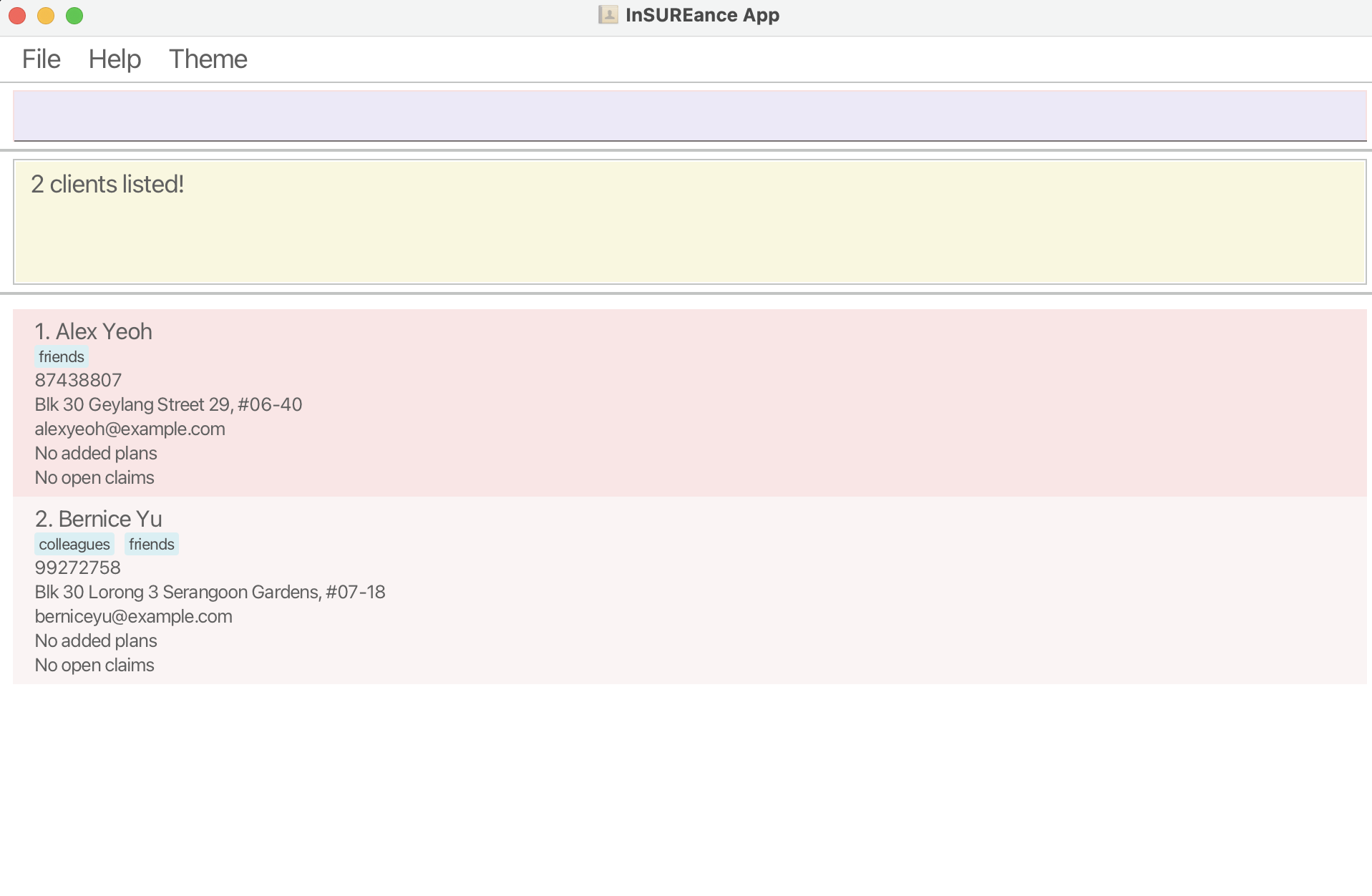
Deleting a client : delete
Deletes the specified client from the address book.
Format: delete INDEX
INDEX: Must be a valid client index in the filtered list that is currently shown.
- Deletes the client at the specified
INDEXfrom the current displayed list on the app. - If the
INDEXis invalid, the user will be informed with an error message.
Input 1: list followed by delete 3
Output 1: Deleted Client: Charlotte Oliveiro; Phone: 93210283; Email: charlotte@example.com; Address: Blk 11 Ang Mo Kio Street 74, #11-04; Insurance Plans: No added plans; Open Claims: No open claims; Tags: [neighbours]
Input 2: find Betsy followed by delete 1
Output 2: Deleted Client: Betsy Crower; Phone: 99272758; Email: berniceyu@example.com; Address: Blk 30 Lorong 3 Serangoon Gardens, #07-18; Insurance Plans: No added plans; Open Claims: No open claims; Tags:
Adding an insurance plan to a client : addInsurance
Adds an insurance plan (given by the INSURANCE_ID) to the client at the specified INDEX.
Format: addInsurance INDEX iid/INSURANCE_ID
| Insurance Plan | INSURANCE_ID |
|---|---|
| Basic Insurance Plan | 0 |
| Travel Insurance Plan | 1 |
INDEX: Must be a valid client index in the filtered list that is currently shown.INSURANCE_ID: Must be an existing valid ID that is currently supported.
Currently supported IDs for insurance plans:Basic Insurance Plan:0&Travel Insurance Plan:1.
- If the
INDEXis invalid, or the client does not have the insurance planINSURANCE_ID, the user will be informed with an error message. - Insurance plan types are preloaded and new types cannot be added by the user. This is to ensure that the plans are consistent with market type plans. In the future, there are some plans to allow users to add their own new types of insurance plans.
- The prefix
iidis case-sensitive.
Input 1: addInsurance 1 iid/1
Output 1: Added Insurance Plan: Travel Insurance Plan, to Client: Alex Yeoh
Deleting an insurance plan from a client : deleteInsurance
Deletes the insurance plan (given by the INSURANCE_ID) from the client at the specified INDEX.
Format: deleteInsurance INDEX iid/INSURANCE_ID
INDEX: Must be a valid client index in the filtered list that is currently shown.INSURANCE_ID: Must be an existing valid ID that is currently supported.
- If the
INDEXis invalid, or the client does not have the insurance planINSURANCE_ID, the user will be informed with an error message.
- The prefix
iidis case-sensitive.
Input 1: deleteInsurance 1 iid/1
Output 1: Deleted Insurance Plan: Travel Insurance Plan, from Client: Alex Yeoh
Adding a claim to the client : addClaim
Adds a claim to the insurance plan of a client.
Format: addClaim INDEX iid/INSURANCE_ID cid/CLAIM_ID ca/CLAIM_AMOUNT_IN_DOLLARS_AND_CENTS
INDEX: Must be a valid client index in the filtered list that is currently shown.INSURANCE_ID: Must be an existing valid ID that is currently supported.CLAIM_ID: A unique id for each claim generated by the insurance company or an external organisation (eg. law firm) before the claim is added to this app.CLAIM_AMOUNT_IN_DOLLARS_AND_CENTS: Follows formatDD.CCeg.151.10. It can contain any number of digits for dollars (leading zeroes will be trimmed), but must be exactly 2 digits for cents. If the claim amount is a whole number eg. 500, enter it as500.00.
- If the
INDEXis invalid, or the client does not have the insurance planINSURANCE_ID, the user will be informed with an error message. - Claim Amount can be 0, in case the claim details have not been finalised and the user wishes to use the claim as as a placeholder claim for now.
- Claim amount is in Singapore dollars.
- Claims are opened with a default status of "open".
- To simulate real world conditions, we have fixed the claim ID to always follow a specific format which is alphabet + 4-digit number. All other format of claims will be considered invalid.
- Same claim ID cannot be added to different plans of the same client.
- A claim is considered a duplicate if there exists another claim of same claim ID for the same client.
- Claim ID is always capitalised in the system so b1234 is the considered the same as B1234.
- Do not add alphabets or any other special characters including but not limited to "$", "£" and "€" in front or behind the claim amount.
- The prefixes such as
iid,cidandcaare case-sensitive.
Input 1: addClaim 1 iid/1 cid/B1234 ca/151.10
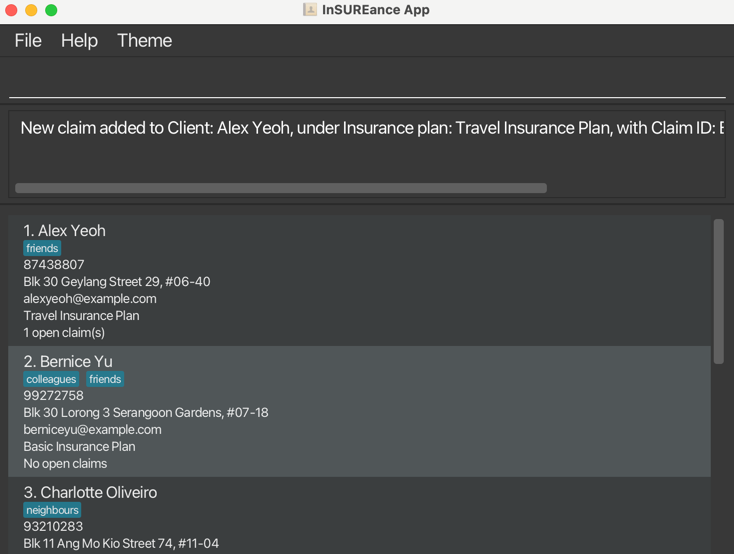
Output 1: New claim added to Client: Alex Yeoh, under Insurance plan: Travel Insurance Plan, with Claim ID: B1234, Claim Amount: $151.10
Deleting a claim from a client : deleteClaim
Deletes a claim from an insurance plan of a client.
Format: deleteClaim INDEX iid/INSURANCE_ID cid/CLAIM_ID
INDEX: Must be a valid client index in the filtered list that is currently shown.INSURANCE_ID: Must be an existing valid ID that is currently supported.CLAIM_ID: A unique id for each claim generated by an insurance company or an external organisation (eg. law firm) before the claim is added to this app.
- If the
INDEXis invalid, or the client does not have the insurance planINSURANCE_ID, the user will be informed with an error message.
- A claim is considered a duplicate if there exists another claim of same claim ID for the same client.
- Claim ID is always capitalised in the system so b1234 is the considered the same as B1234.
- Do not add alphabets or any other special characters including but not limited to "$", "£" and "€" in front or behind the claim amount.
- The prefixes such as
iidandcidare case-sensitive.
Input 1: deleteClaim 1 iid/1 cid/B1234
Output 1: Claim deleted from Client: Alex Yeoh, under Insurance plan: Travel Insurance Plan, with Claim ID: B1234
Closing a claim of a client : closeClaim
Closes a claim from an insurance plan of a client.
Format: closeClaim INDEX iid/INSURANCE_ID cid/CLAIM_ID
INDEX: Must be a valid client index in the filtered list that is currently shown.INSURANCE_ID: Must be an existing valid ID that is currently supported.CLAIM_ID: A unique id for each claim generated by an insurance company or an external organisation (eg. law firm) before the claim is added to this app.
- The claim will still be tagged to the client in the system but marked as closed.
- If the
INDEXis invalid, or the client does not have the insurance planINSURANCE_ID, the user will be informed with an error message.
Input 1: closeClaim 1 iid/1 cid/B1234
Output 1: Claim from Client: Alex Yeoh, under Insurance plan: Travel Insurance Plan, with Claim ID: B1234 marked as closed
Listing all claims associated with a client : listClaims
Lists all claims that the client has associated with them.
Format: listClaims INDEX
INDEX: Must be a valid client index in the filtered list that is currently shown.
- If the
INDEXis invalid, the user will be informed with an error message.
Input 1: listClaims 1
Output 1: 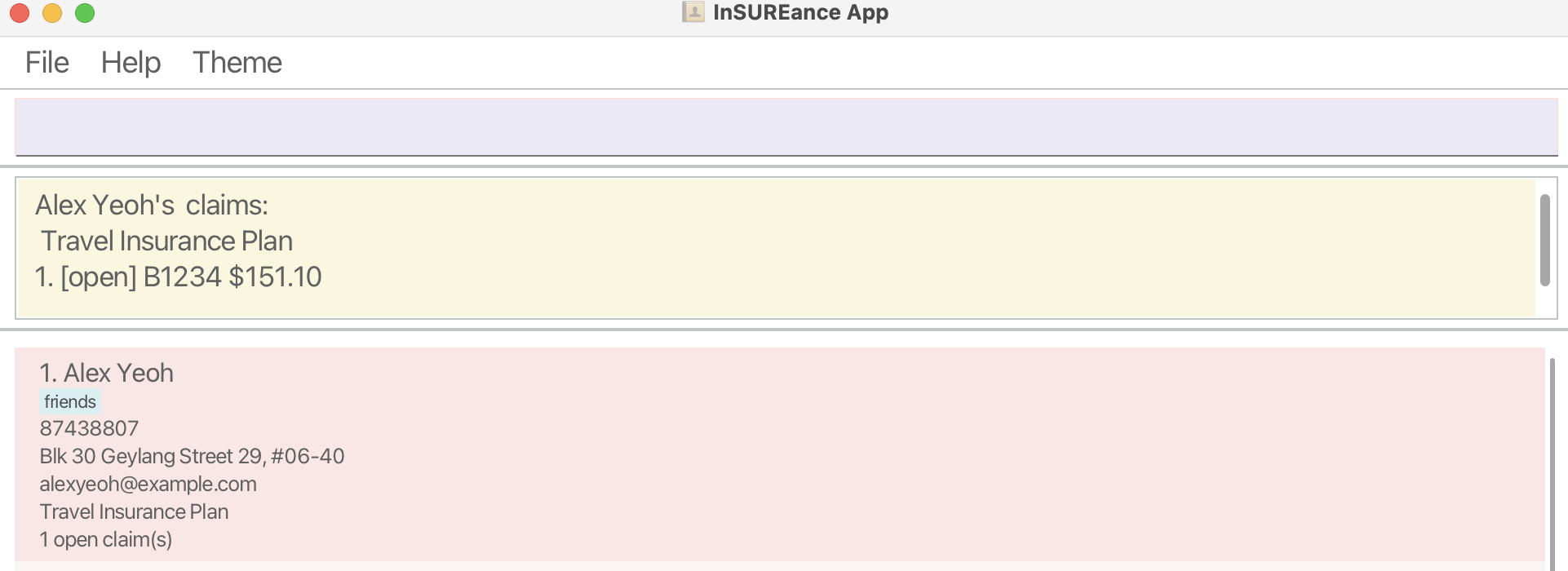
Clearing all entries : clear
Clears all entries from the address book.
Format: clear
Exiting the program : exit
Exits the program.
Format: exit
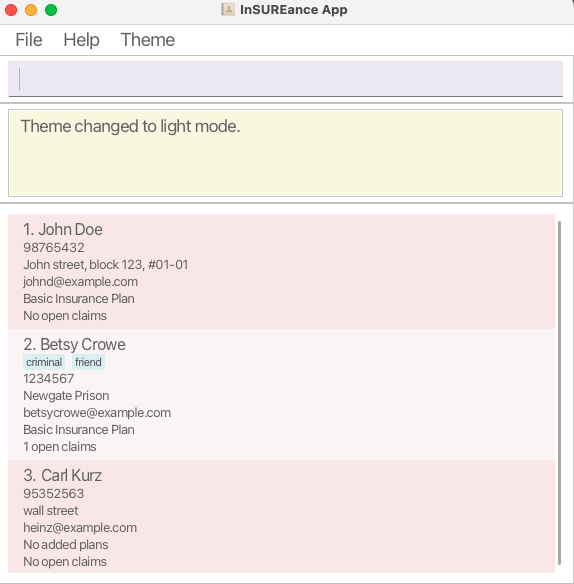
Changing the theme of the app
Click Theme to toggle between Dark Theme and Light Theme.
Dark Theme (default)
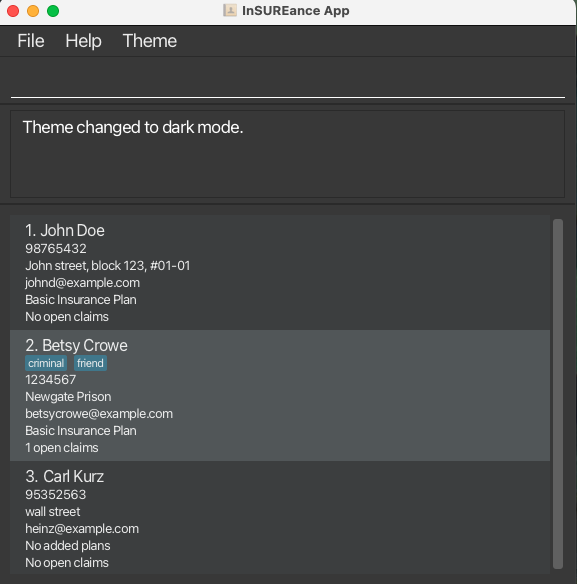
Light Theme
Saving the data
App data are saved in the hard disk automatically after any command that changes the data. There is no need to save manually.
Note: This would only take effect after a successful command is executed.
Editing the data file
App data are saved automatically as a JSON file [JAR file location]/data/InSUREance.json. Advanced users are welcome to update data directly by editing that data file.
Caution:
If your changes to the data file makes its format invalid, app will discard all data at the start of the next run.
A new data file without previously saved data will replace the corrupted file once a new successful command is executed.
Hence, it is recommended to take a backup of the file before editing it.
Furthermore, certain edits can cause the app to behave in unexpected ways (e.g., if a value entered is outside the acceptable range).
Therefore, edit the data file only if you are confident that you can update it correctly.
Auto-Sorting of claims
Claims will be automatically sorted to show the open claims first, followed by in alphanumeric order of claim ID. This occurs whenever a claim is modified using the app and there is no need to manually call this.
FAQ
Q: How do I transfer my data to another Computer?
A: Install the app in the other computer and overwrite the initial data file it generates with the file that contains
the data of your previous app home folder.
Known issues
- When using multiple screens, if you move the application to a secondary screen, and later switch to using only the primary screen, the GUI will open off-screen. The remedy is to delete the
preferences.jsonfile created by the application before running the application again. - If you minimize the Help Window and then run the
helpcommand (or use theHelpmenu, or the keyboard shortcutF1) again, the original Help Window will remain minimized, and no new Help Window will appear. The remedy is to manually restore the minimized Help Window. - Currency for claim amount may not always be in Singapore dollars (SGD), thus you may wish to convert the foreign currency to SGD before adding it into the app.
Command summary
| Action | Format, Examples |
|---|---|
| Add | add n/NAME p/PHONE_NUMBER e/EMAIL a/ADDRESS [t/TAG]… e.g., add n/James Ho p/22224444 e/jamesho@example.com a/123, Clementi Rd, 1234665 t/friend t/colleague |
| Clear | clear |
| Delete | delete INDEXe.g., delete 3 |
| Edit | edit INDEX [n/NAME] [p/PHONE_NUMBER] [e/EMAIL] [a/ADDRESS] [t/TAG]…e.g., edit 2 n/James Lee e/jameslee@example.com |
| Find | find KEYWORD [MORE_KEYWORDS]e.g., find James Jake |
| AddInsurance | addInsurance INDEX iid/INSURANCE_IDeg., addInsurance 1 iid/ 1 |
| DeleteInsurance | deleteInsurance INDEX iid/INSURANCE_IDeg., deleteInsurance 1 iid/ 1 |
| AddClaim | addClaim INDEX iid/INSURANCE_ID cid/CLAIM_ID ca/CLAIM_AMOUNT_IN_DOLLARS_AND_CENTSeg., addClaim 1 iid/1 cid/B1234 ca/151.20 |
| DeleteClaim | deleteClaim INDEX iid/INSURANCE_ID cid/CLAIM_IDeg., deleteClaim 1 iid/1 cid/B1234 |
| CloseClaim | closeClaim INDEX iid/INSURANCE_ID cid/CLAIM_IDeg., closeClaim 1 iid/1 cid/B1234 |
| ListClaims | listClaims INDEX eg., listClaims 1 |
| List | list |
| Help | help |